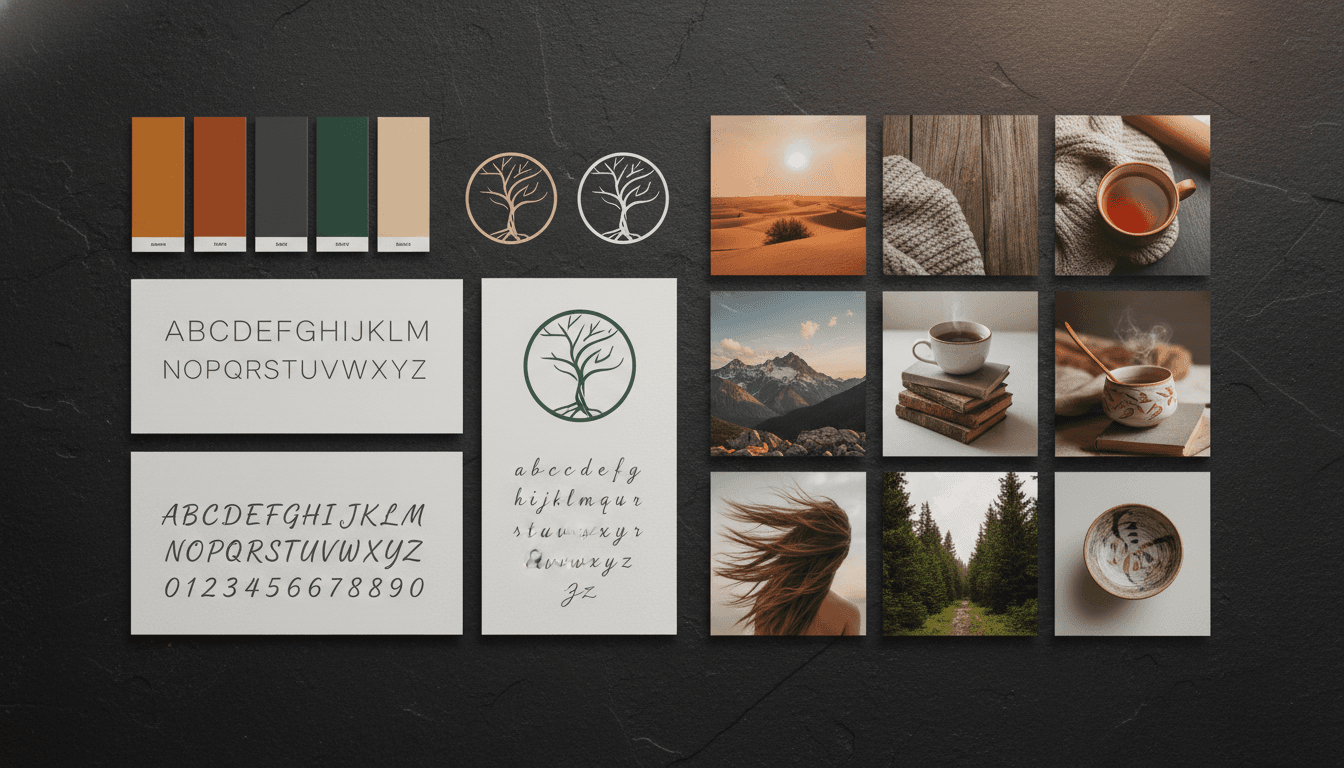
Brand Kit Workflows for AI Content Teams
How to set up and use brand kits to streamline AI content production — covering kit structure, team access, template systems, and quality control across image, video, and carousel workflows.
Most content teams adopt AI generation tools and immediately run into the same problem: everyone produces content that looks different. The designer uses one color palette, the marketer guesses a similar one, and the social media manager picks a third. Within a month, the brand's visual identity becomes a patchwork of inconsistent outputs.
The fix is not more guidelines documents. It is a brand kit workflow — a system where brand constraints are embedded into the generation process itself.
What Is a Brand Kit Workflow?
A brand kit workflow connects your stored brand assets directly to your content generation tools. Instead of referencing a PDF style guide and manually typing hex codes into prompts, the brand kit is loaded before generation starts. Every output — whether it is an image, a carousel, or a video — inherits the brand constraints automatically.
This approach has three benefits:
- Speed — No time spent looking up colors, fonts, or visual references
- Consistency — Every output matches the brand regardless of who creates it
- Scalability — New team members produce on-brand content from day one
What Goes Into a Brand Kit
A brand kit for AI content workflows is more specific than a traditional brand guidelines document. It needs to contain elements that AI tools can actually use:
Visual Identity
- Primary and secondary colors as hex codes (not just "brand blue")
- Logo files in PNG or SVG with transparent backgrounds
- Font families with specific weights for headlines, subheadings, and body text
- Icon style — outlined, filled, or custom set
Mood and Aesthetic
- 3 to 5 mood descriptors (e.g., minimal, warm, professional, clean, bold)
- Reference images that represent the target visual style (5 to 10 images)
- Anti-references — images that show what the brand should NOT look like
- Preferred composition styles — centered, asymmetric, rule-of-thirds, etc.
Content Patterns
- Voice and tone descriptors for text content
- Common content types with example outputs (social post, blog header, product shot)
- Platform-specific variations (Instagram 4:5, LinkedIn 1:1, wide banner, etc.)
Technical Specifications
- Output dimensions for each platform and content type
- File format preferences (PNG for graphics, JPEG for photos, PDF for carousels)
- Resolution requirements for print vs. digital use
Setting Up the Kit Once
The initial setup takes 30 to 60 minutes but saves hours every week after that. Here is the process:
- Gather existing assets — Collect your logos, hex codes, font files, and any existing brand guidelines
- Select reference images — Pick 5 to 10 images from your best-performing content or inspiration sources that represent how you want generated content to look
- Document mood and constraints — Write 3 to 5 mood descriptors and any explicit restrictions (e.g., "no neon colors," "no busy backgrounds")
- Create prompt templates — Build reusable prompt structures for your most common content types with brand variables built in
- Store everything in one accessible location — The kit should be loadable in one click, not scattered across drives and documents
With Morphica's brand kits, this entire process happens in a single interface. Upload your logo, define your colors, add reference images, and the kit is ready to apply to any generation — images, carousels, or video.
Using the Kit in Daily Production
Once the brand kit is set up, the daily workflow becomes:
For Images
- Select the brand kit
- Write your generation prompt (focusing on content, not on brand details — the kit handles those)
- Generate 3 to 5 variations
- Select the best match
- Refine if needed
For Carousels
- Select the brand kit
- Input your topic and outline
- Let the template system apply brand fonts, colors, and layout patterns
- Review and edit individual slides
- Export
For Video
- Select the brand kit
- Define the scene or motion
- Generate with brand color and mood constraints applied
- Review for consistency
The pattern is the same: load the kit first, generate second. Brand constraints are applied before you start creating, not checked after you finish.
Team Access and Shared Kits
For teams, the brand kit needs to be a shared resource, not something stored in one person's account.
Access Structure
- Brand owners can create and modify the kit
- Team members can use the kit for generation but cannot alter the core brand elements
- External collaborators (freelancers, agencies) can be given kit access without needing the full workfap
Onboarding New Members
When a new team member joins, they should be able to:
- Access the shared brand kit
- See example outputs generated with that kit
- Start producing on-brand content immediately
- Understand the review process before publishing
No training on hex codes, font choices, or style guide documents needed. The kit handles it.
Quality Control at Scale
Even with a brand kit, quality control is necessary. The kit ensures baseline consistency, but individual outputs still need human judgment:
Pre-Publish Checklist
- Do the dominant colors match the brand palette?
- Is text added using brand fonts (not AI-generated type)?
- Does the composition match the brand's visual patterns?
- Is the overall mood consistent with other recent content?
- Are dimensions correct for the target platform?
Weekly Brand Audit
Once a week, lay out everything your team published that week in a single view. This grid test immediately reveals inconsistencies that individual review might miss. If any piece looks out of place, trace back to what went wrong — a missing brand kit reference? A new team member who skipped the kit? A prompt that overrode the brand constraints?
Monthly Kit Refinement
Brand kits are not static. Based on what you learn from production, refine the kit monthly:
- Add new reference images from your best-performing content
- Remove references that are no longer accurate
- Adjust mood descriptors based on evolving brand direction
- Update prompt templates that consistently need manual correction
Common Team Workflow Mistakes
Storing the kit in one person's local files. If the brand kit is on someone's laptop, it's effectively invisible to the rest of the team. Use a shared system.
Skipping the kit for "quick" content. Quick content that is off-brand is worse than no content. The kit adds 10 seconds to the workflow. Always load it.
Having multiple competing brand kits. If multiple people create their own version of the brand kit, you end up right back at the consistency problem. Designate one canonical kit.
Not updating the kit as the brand evolves. Brands change. If the kit reflects last year's visual identity, current output will feel outdated. Schedule regular updates.
Measuring Kit Effectiveness
Track these metrics to verify your brand kit is working:
- Time from brief to published asset — Should decrease as the team internalizes the kit workflow
- Number of revision rounds — Should decrease as the kit reduces off-brand first drafts
- Visual consistency score — Score published content on a 1-5 brand match scale; track the average over time
- Team adoption rate — What percentage of content is generated with the kit loaded? Target 100%
The goal is to make on-brand content the default output. When the brand kit handles the visual constraints, your team can focus their creative energy on message, content, and strategy — not on remembering which shade of orange to use.
Ready to build your brand kit? Set up your brand kit in Morphica and start producing consistent content across images, carousels, and video from a single visual identity.